
Blog, Canon MAXIFY GX5570 MegaTank Printer Dealer in Chandra Layout, Printers

Canon MAXIFY GX5570 MegaTank Wireless Business Ink Tank Printer Dealer in Chandra Layout – Digitech Imaging Solution

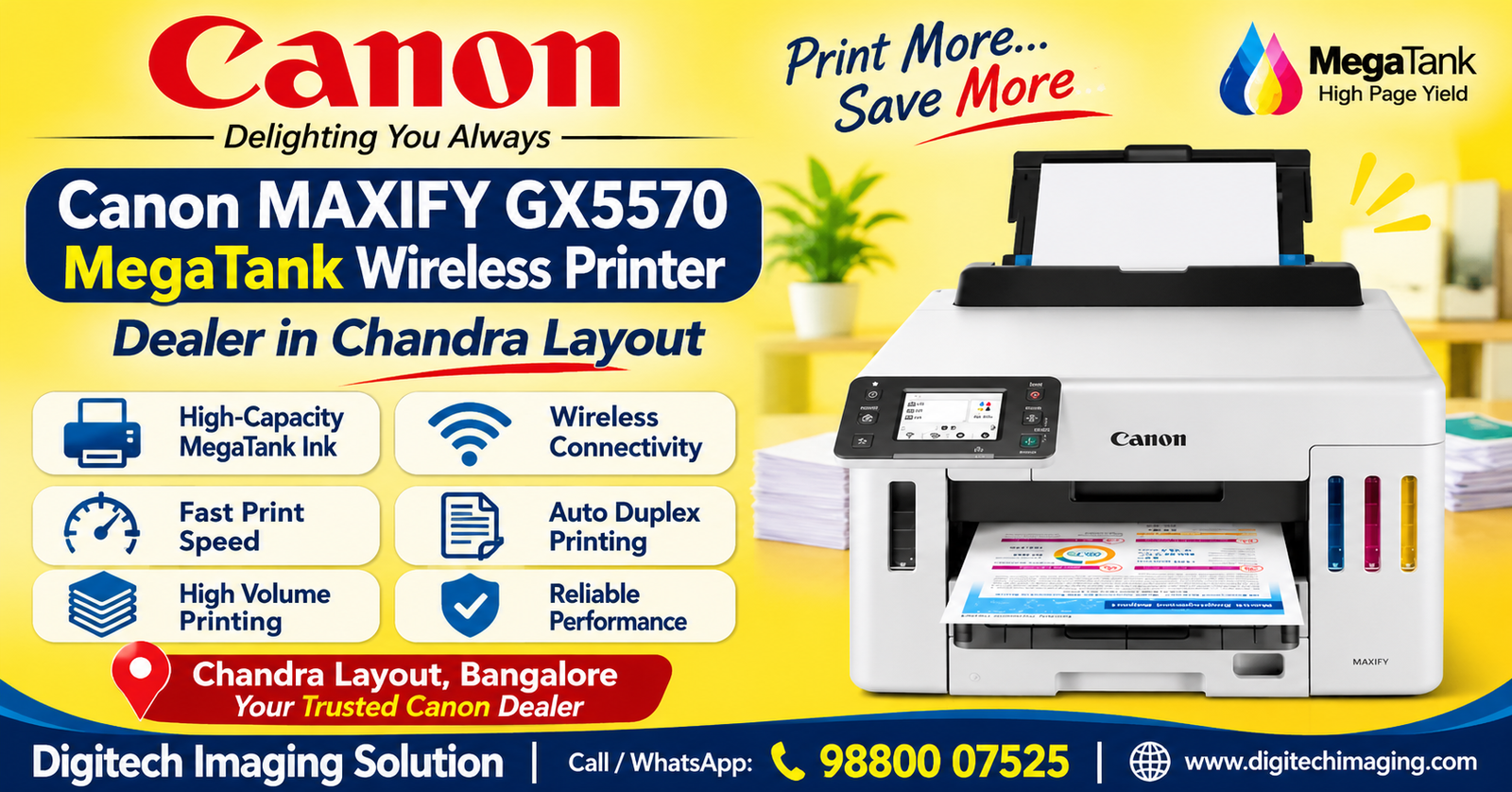
Canon MAXIFY GX5570 MegaTank Printer Dealer in Chandra Layout

Are you searching for a reliable Canon MAXIFY GX5570 MegaTank Wireless Business Ink Tank Printer Dealer in Chandra Layout? If your business needs a high-performance colour ink tank printer for regular document printing, the Canon MAXIFY GX5570 is a model worth considering. Designed for small businesses and professional work environments, this printer combines high-yield pigment ink technology, wireless connectivity, automatic duplex printing and large paper capacity.

Digitech Imaging Solution helps customers explore printer and office imaging products for their home, office and business requirements. If you are planning to purchase the Canon MAXIFY GX5570 in Chandra Layout, Bangalore, contact our team to enquire about product availability, pricing and purchase options.

The Canon MAXIFY GX5570 is designed for businesses that need dependable document printing and convenient network connectivity. Its high-yield ink bottles and multiple paper trays make it suitable for regular office printing requirements.

In this article, we explain the printer’s features, technical specifications, benefits, ink bottle details, connectivity options and important points to consider before purchasing.

Canon MAXIFY GX5570 MegaTank Wireless Printer Dealer in Chandra Layout – Product Overview

The Canon MAXIFY GX5570 is a wireless business ink tank printer designed for small offices and businesses. It uses Canon’s MegaTank technology with high-yield pigment ink bottles to support regular document printing.

The printer delivers A4 print speeds of up to 24 images per minute for monochrome documents and 15.5 images per minute for colour documents under the specified ISO testing conditions.

One of its major advantages is its large paper capacity. The printer supports up to 600 sheets of plain paper across its rear tray and two paper cassettes. This helps reduce the need for frequent paper reloading.

The GX5570 also supports automatic two-sided printing, USB, Ethernet and Wi-Fi connectivity. Its pigment-based ink system is designed to produce clear business documents with resistance to water and highlighter smudging under suitable conditions.

Important: The Canon MAXIFY GX5570 is a single-function printer. It supports printing only and does not include built-in scanning, copying or faxing.

Canon MAXIFY GX5570 MegaTank Wireless Printer Dealer in Chandra Layout – Key Features

High-Speed Business Printing

The Canon MAXIFY GX5570 offers A4 print speeds of up to 24 ipm in black and 15.5 ipm in colour.

This makes it suitable for printing everyday business documents, office reports, invoices, quotations and colour materials.

High-Yield MegaTank Ink Bottles

The printer uses Canon GI-76 pigment ink bottles. The high-yield ink system is designed to support regular business printing while reducing the frequency of ink refilling.

Canon specifies yields of up to 6,000 pages for black and 14,000 pages for colour under its standard stated testing conditions. In Economy Mode, the estimated yields can reach 9,000 black pages and 21,000 colour pages.

Actual page yields depend on document coverage, printing conditions and usage.

Automatic Duplex Printing

Automatic duplex printing allows users to print on both sides of compatible paper without manually turning the pages.

Benefits include:

  • Reduced paper consumption

  • Convenient printing of multi-page documents

  • Less manual paper handling

  • Professional-looking business reports

  • Better use of office paper supplies

Wireless Wi-Fi Connectivity

The Canon MAXIFY GX5570 supports wireless network connectivity, allowing compatible devices to send print jobs without a direct USB connection.

It also supports wired LAN and direct wireless printing options, providing flexibility for different office network environments.

Large 600-Sheet Paper Capacity

The printer supports a combined plain-paper capacity of up to 600 sheets across the rear tray and two paper cassettes.

This is useful for businesses that regularly print documents and want to reduce interruptions caused by frequent paper loading.

Pigment Ink for Business Documents

The GX5570 uses pigment-based black, cyan, magenta and yellow inks.

Pigment ink technology is designed to produce sharp business documents and help printed output resist water exposure and highlighter smudging under suitable conditions.

User-Replaceable Maintenance Cartridge

The printer supports a user-replaceable MC-G01 maintenance cartridge.

This component helps manage maintenance-related ink collection and makes routine maintenance more convenient when replacement is required.

 Colour Touchscreen Display

The Canon MAXIFY GX5570 includes a colour LCD touchscreen that helps users navigate printer settings and manage everyday printing operations.

Canon MAXIFY GX5570 MegaTank Wireless Printer Dealer in Chandra Layout – Technical Specifications

Specification Details
Model Canon MAXIFY GX5570
Printer type Colour MegaTank Ink Tank Printer
Functions Single Function – Print Only
Print speed (Mono) Up to 24 ipm
Print speed (Colour) Up to 15.5 ipm
Maximum print resolution 600 × 1,200 dpi
Automatic duplex Yes
Paper input capacity Up to 600 sheets
Connectivity USB, Ethernet, Wi-Fi, Direct Wireless
Ink technology Pigment ink
Ink bottle series Canon GI-76
Display Colour touchscreen LCD
Maintenance cartridge MC-G01
Dimensions Approx. 399 × 410 × 298 mm
Weight Approx. 10.4 kg
Recommended monthly print volume 300–2,500 pages

Canon MAXIFY GX5570 MegaTank Wireless Printer Dealer in Chandra Layout – Benefits for Small Businesses

For Corporate Offices

Corporate offices regularly print invoices, quotations, reports, business letters and administrative documents.

The Canon MAXIFY GX5570 offers fast document printing, automatic duplex functionality and network connectivity for compatible office setups.

For Small and Medium Businesses

Small and medium-sized businesses often require a printer that can handle regular document workloads.

Its large paper capacity and high-yield ink system can help reduce interruptions during everyday printing operations.

For Retail Shops

Retail establishments may need to print quotations, price lists, invoices, product information and customer documents.

The GX5570’s colour printing and flexible paper handling can support these everyday requirements.

For Educational Institutions

Schools, colleges and training centres regularly print notices, worksheets, reports and educational documents.

The printer’s pigment ink system and automatic duplex feature can be useful for regular document printing.

For Home Offices

Professionals working from home may need a business printer for reports, forms, invoices and other office documents.

Wireless connectivity can make it convenient to print from compatible computers and mobile devices.

Canon MAXIFY GX5570 MegaTank Wireless Printer Dealer in Chandra Layout – Understanding GI-76 Ink Bottles

Ink selection is an important consideration when purchasing a MegaTank printer. The Canon MAXIFY GX5570 uses the GI-76 pigment ink bottle series.

Compatible ink bottles include:

  • GI-76 PGBK: Pigment black

  • GI-76 C: Pigment cyan

  • GI-76 M: Pigment magenta

  • GI-76 Y: Pigment yellow

Canon lists approximate standard yields of:

  • Black: Up to 6,000 pages

  • Each colour: Up to 14,000 pages

In Economy Mode, Canon specifies estimated yields of up to 9,000 black pages and 21,000 colour pages.

These figures are based on Canon’s stated testing methodology. Actual yields vary according to document coverage, print settings, frequency of use and operating conditions.

Before purchasing replacement ink, check the GI-76 bottle model and compatibility with your printer.

Canon MAXIFY GX5570 MegaTank Wireless Printer Dealer in Chandra Layout – Wireless Printer Setup

Wireless printing helps businesses share a printer across compatible devices.

Follow these general steps to connect the Canon MAXIFY GX5570:

  1. Place the printer near a suitable power source and within range of the office network.

  2. Switch on the printer.

  3. Open the printer’s network settings.

  4. Select the appropriate Wi-Fi network.

  5. Enter the wireless password.

  6. Install the correct Canon printer driver on your computer.

  7. Add the printer through your computer’s printer settings.

  8. Print a test page to confirm connectivity.

The printer also supports USB and wired Ethernet connections. Choose the connection method that best suits your office network.

For mobile printing, compatible Canon printing applications and supported services such as Apple AirPrint and Mopria can be used, subject to device and network compatibility.

Canon MAXIFY GX5570 MegaTank Wireless Printer Dealer in Chandra Layout – What to Check Before Buying

Before purchasing the Canon MAXIFY GX5570, consider the following points.

1. Monthly print volume: Estimate how many black-and-white and colour pages your business prints every month.

2. Printer functions: The GX5570 is a print-only model. If you need scanning or photocopying, consider a multifunction printer.

3. Ink requirements: Check the availability and cost of original Canon GI-76 ink bottles.

4. Paper capacity: Consider whether the 600-sheet capacity is suitable for your daily printing workload.

5. Connectivity: Confirm whether you need Wi-Fi, Ethernet or USB connections.

6. Automatic duplex: Check whether automatic two-sided printing is useful for your business documents.

7. Maintenance: Understand the MC-G01 maintenance cartridge replacement requirements.

8. Warranty: Confirm the applicable warranty conditions before purchase.

9. Physical space: Check the printer dimensions and available desk space.

Canon MAXIFY GX5570 MegaTank Wireless Printer Dealer in Chandra Layout – Frequently Asked Questions

Where can I enquire about the Canon MAXIFY GX5570 in Chandra Layout?

You can contact Digitech Imaging Solution to enquire about product details, availability, pricing and purchase options.

Is the Canon MAXIFY GX5570 a multifunction printer?

No. It is a single-function printer designed for printing only. It does not include built-in scanning or photocopying.

Does the Canon MAXIFY GX5570 support Wi-Fi?

Yes. It supports wireless connectivity, as well as wired Ethernet and USB connections.

Does the Canon MAXIFY GX5570 support automatic duplex printing?

Yes. It supports automatic two-sided printing for compatible paper sizes.

Which ink bottles are used in the Canon MAXIFY GX5570?

It uses Canon GI-76 pigment ink bottles in black, cyan, magenta and yellow.

What is the print speed of the Canon MAXIFY GX5570?

The rated A4 print speed is up to 24 images per minute in monochrome and 15.5 images per minute in colour.

 What is the paper capacity of the Canon MAXIFY GX5570?

It supports up to 600 sheets of plain paper across its rear tray and two paper cassettes.

 Is the Canon MAXIFY GX5570 suitable for small businesses?

It is designed for small business printing requirements, particularly where regular colour and monochrome document printing is needed.

What maintenance cartridge does the Canon MAXIFY GX5570 use?

It uses the Canon MC-G01 user-replaceable maintenance cartridge.

How can I check the Canon MAXIFY GX5570 price in Chandra Layout?

Contact Digitech Imaging Solution to enquire about the latest selling price, stock availability and purchase details.

Call Now: +91 98806 76014 / +91 97311 17688

Are you looking for theCanon MAXIFY GX5570 MegaTank Wireless Printer Dealer in Chandra Layout?

Leave a Reply

Your email address will not be published. Required fields are marked *