
Blog, Epson EcoTank L3250 Printer, Epson Printers Dealers In Bangalore, Ink Tank Printers, Printers

Epson EcoTank L3250 A4 Wi-Fi All-in-One Ink Tank Printer in Bagalore

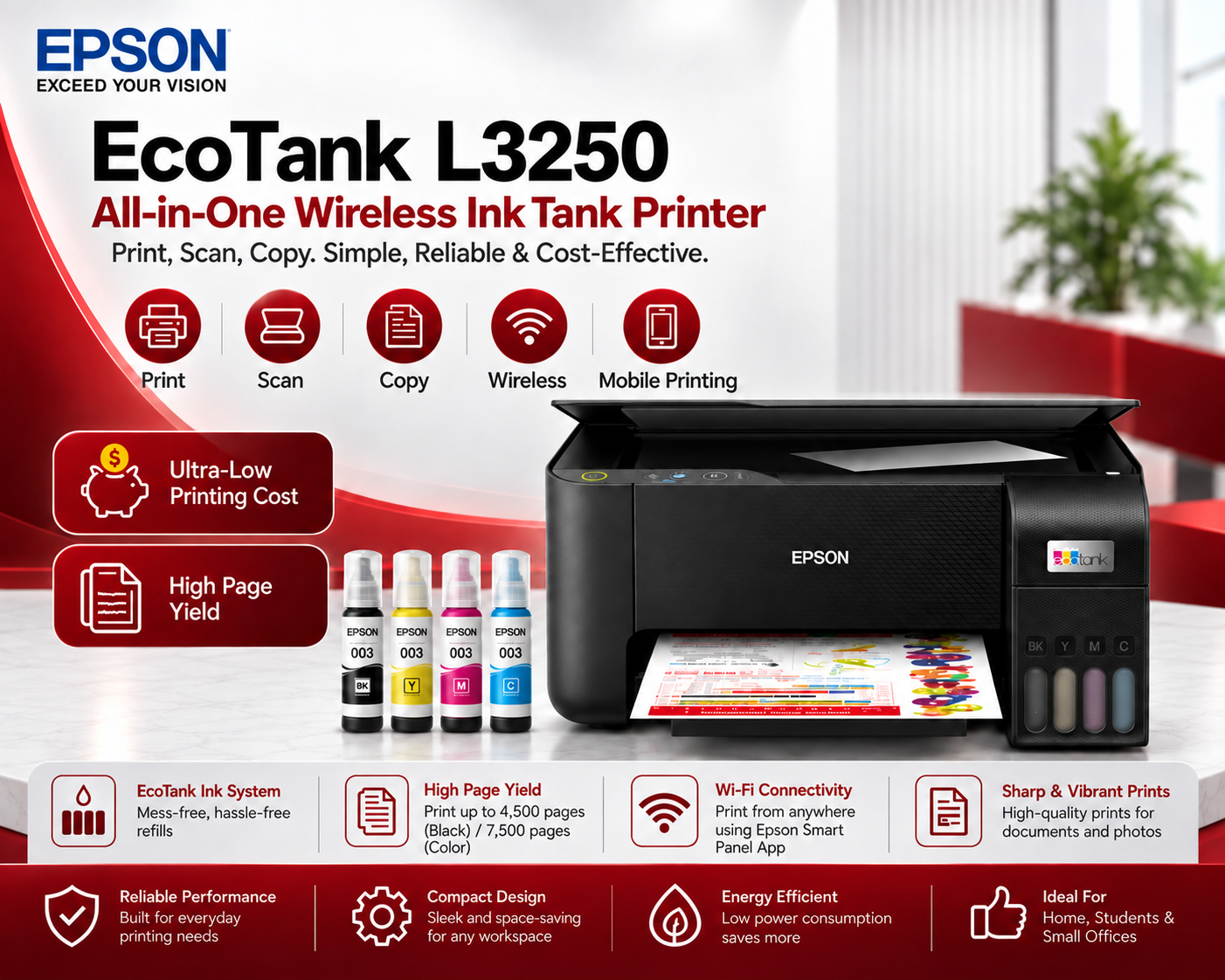
Epson EcoTank L3250 A4 Wi-Fi All-in-One Ink Tank Printer

Epson EcoTank L3250 A4 Wi-Fi All-in-One Ink Tank Printer – Product Overview

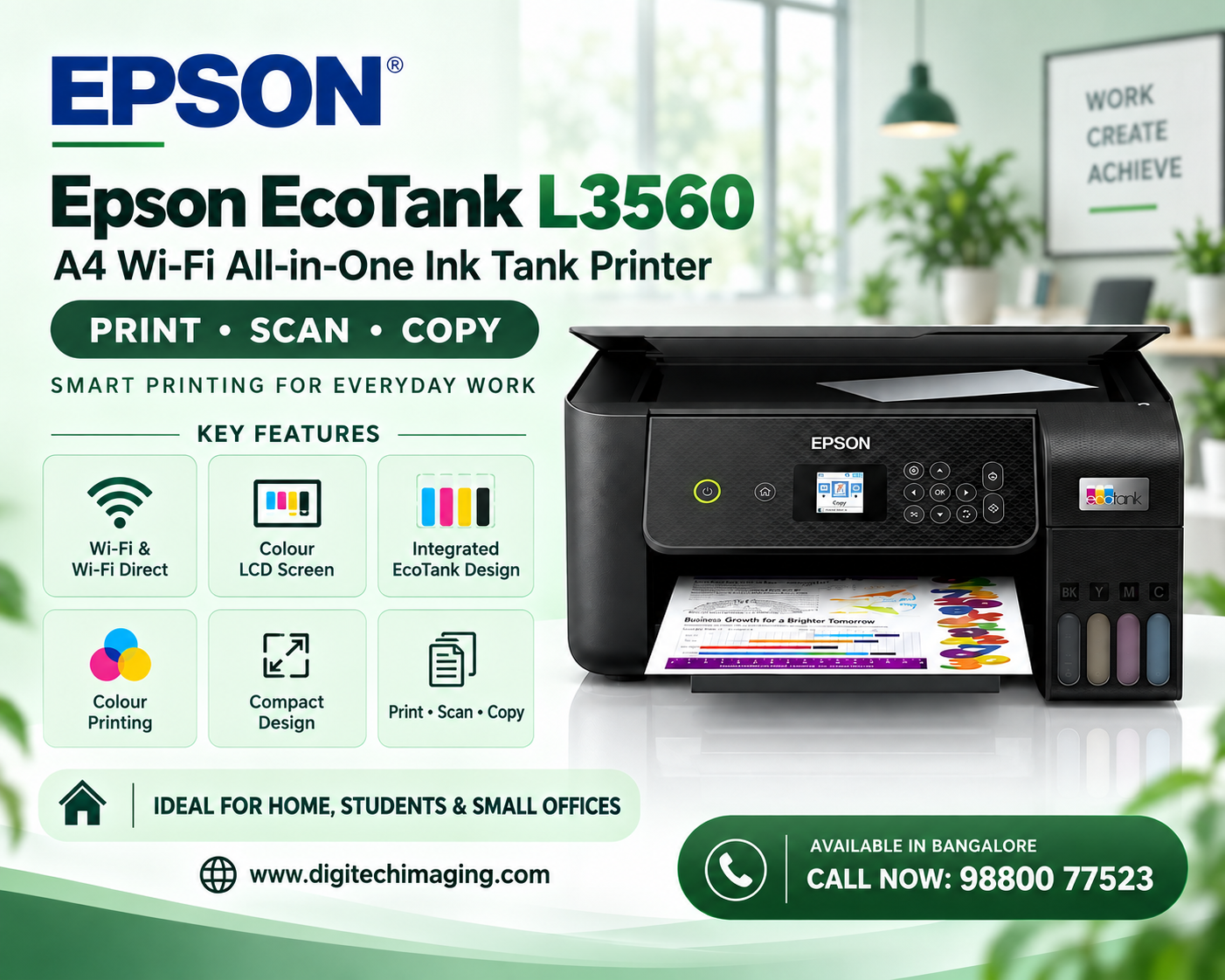
The Epson EcoTank L3250 A4 Wi-Fi All-in-One Ink Tank Printer combines three important office and home functions:

  • Print
  • Scan
  • Copy

It is an A4 colour ink tank printer designed around Epson’s integrated refillable EcoTank system.

Instead of frequently replacing conventional cartridges, users refill separate black, cyan, magenta and yellow ink tanks using compatible Epson ink bottles.

The L3250 is especially useful for customers who need wireless printing. It supports both Wi-Fi and Wi-Fi Direct, giving users flexibility when connecting compatible computers and mobile devices.

Epson EcoTank L3250 A4 Wi-Fi All-in-One Ink Tank Printer – Key Specifications

Lorem ipsum dolor sit amet, consectetur adipiscing elit. Ut elit tellus, luctus nec ullamcorper mattis, pulvinar dapibus leo.

Epson EcoTank L3250 A4 Wi-Fi All-in-One Ink Tank Printer – Wi-Fi Connectivity

Wireless connectivity is one of the biggest advantages of the Epson EcoTank L3250 A4 Wi-Fi All-in-One Ink Tank Printer.

The printer supports Wi-Fi, allowing it to connect to a compatible wireless network.

Once properly configured, supported devices connected to the network can access the printer without requiring a USB cable for every device.

Wireless printing can be particularly convenient in:

  • Homes
  • Home offices
  • Small businesses
  • Student rooms
  • Tuition centres
  • Small professional offices

A laptop can remain on a desk while the printer is positioned elsewhere within suitable network range.

Epson EcoTank L3250 A4 Wi-Fi All-in-One Ink Tank Printer – Wi-Fi Direct

The Epson EcoTank L3250 A4 Wi-Fi All-in-One Ink Tank Printer also supports Wi-Fi Direct.

Wi-Fi Direct allows compatible devices to connect directly to the printer without requiring a wireless router for that connection.

Epson states that Wi-Fi Direct can connect up to eight devices to the L3250.

This is particularly useful when:

  • A Wi-Fi router is unavailable
  • Multiple family members need printer access
  • Students need to print from mobile devices
  • A small office wants flexible wireless access
  • Visitors occasionally need printer connectivity

Epson EcoTank L3250 A4 Wi-Fi All-in-One Ink Tank Printer – Epson Smart Panel

Another convenient feature of the Epson EcoTank L3250 A4 Wi-Fi All-in-One Ink Tank Printer is support for the Epson Smart Panel application.

The app allows a compatible smartphone or tablet to function as a convenient control centre for the printer.

Depending on configuration and supported features, users can perform tasks such as:

  • Printer setup
  • Wi-Fi configuration
  • Printing
  • Scanning
  • Copy-related controls
  • Troubleshooting

For users who frequently work from smartphones and tablets, mobile printer management can make everyday printing more convenient.

Epson EcoTank L3250 A4 Wi-Fi All-in-One Ink Tank Printer – Printing Speed

The Epson EcoTank L3250 A4 Wi-Fi All-in-One Ink Tank Printer offers practical performance for home and small-office documents.

Rated ISO A4 simplex print speeds reach approximately:

Black: Up to 15 ipm

Colour: Up to 8 ipm

In draft A4 mode, Epson rates the printer at up to:

Black: 33 ppm

Colour: 20 ppm

Actual printing speeds can vary depending on print settings, document complexity, computer configuration, connectivity and paper type.

These speeds are suitable for everyday printing including:

  • Assignments
  • Reports
  • Study materials
  • Invoices
  • Quotations
  • Business letters
  • Application forms
  • Presentations
  • Colour charts
  • Photographs

Epson EcoTank L3250 A4 Wi-Fi All-in-One Ink Tank Printer – High-Resolution Printing

The Epson EcoTank L3250 A4 Wi-Fi All-in-One Ink Tank Printer supports a maximum print resolution of up to 5760 × 1440 dpi.

High-resolution colour output can be useful for documents containing:

  • Detailed text
  • Colour photographs
  • Graphics
  • School projects
  • Charts
  • Graphs
  • Business presentations
  • Logos
  • Illustrations
  • Marketing materials

This flexibility allows users to print standard business documen

Epson EcoTank L3250 A4 Wi-Fi All-in-One Ink Tank Printer – EcoTank Ink System

A major selling point of the Epson EcoTank L3250 A4 Wi-Fi All-in-One Ink Tank Printer is its integrated refillable ink system.

The printer contains separate tanks for:

  • Black
  • Cyan
  • Magenta
  • Yellow

Users can visually monitor ink levels and refill the required colour when necessary.

The integrated tank design also helps keep the overall printer compact compared with older external-tank configurations.

Epson’s bottle-nozzle system is designed to make refilling straightforward while helping prevent incorrect colour filling.

Epson EcoTank L3250 A4 Wi-Fi All-in-One Ink Tank Printer – High-Yield Ink Bottles

The Epson EcoTank L3250 A4 Wi-Fi All-in-One Ink Tank Printer uses high-yield replacement ink bottles.

Epson rates the applicable replacement ink yields at approximately:

Black: Up to 4,500 pages

Colour: Up to 7,500 pages composite yield

Actual page yield varies according to the type of documents printed, print settings, usage frequency, temperature, humidity and maintenance requirements.

High-yield refillable ink can be particularly valuable for users who print frequently.

Epson EcoTank L3250 A4 Wi-Fi All-in-One Ink Tank Printer – T00V Ink

The Epson EcoTank L3250 A4 Wi-Fi All-in-One Ink Tank Printer is compatible with Epson’s T00V ink bottle series in India.

The set consists of:

  • T00V Black
  • T00V Cyan
  • T00V Magenta
  • T00V Yellow

Using the correct ink designed for the printer helps maintain compatibility and consistent print performance.

Customers purchasing replacement ink should always confirm the ink code and colour before refilling.

Epson EcoTank L3250 A4 Wi-Fi All-in-One Ink Tank Printer – Borderless Photo Printing

The Epson EcoTank L3250 A4 Wi-Fi All-in-One Ink Tank Printer is also capable of producing small borderless photographs.

Borderless printing is supported up to 4R / 4 × 6 inches.

Users can produce:

  • Family photos
  • School project photographs
  • Creative designs
  • Small promotional images
  • Personal photo collections
  • Educational images

For better photo output, customers should select suitable photo paper and appropriate printer settings.

Epson EcoTank L3250 A4 Wi-Fi All-in-One Ink Tank Printer – Epson Heat-Free Technology

The Epson EcoTank L3250 A4 Wi-Fi All-in-One Ink Tank Printer incorporates Epson Heat-Free Technology.

Epson’s inkjet technology does not require heat during the ink-ejection process.

For customers comparing ink tank printers for frequent home or office use, energy consumption and overall operating requirements can be important factors alongside print quality and ink cost.

Epson EcoTank L3250 A4 Wi-Fi All-in-One Ink Tank Printer – Ideal for Students

The Epson EcoTank L3250 A4 Wi-Fi All-in-One Ink Tank Printer is particularly useful for students who regularly print educational material.

It can be used for:

  • Assignments
  • Projects
  • Study notes
  • Worksheets
  • Application forms
  • Research material
  • Charts
  • Images
  • Presentations
  • Online learning documents

Wireless connectivity is particularly convenient because students can print from compatible devices without connecting a USB cable each time.

Epson EcoTank L3250 A4 Wi-Fi All-in-One Ink Tank Printer – Ideal for Home Use

For families, the Epson EcoTank L3250 A4 Wi-Fi All-in-One Ink Tank Printer provides a useful combination of everyday functions.

One printer can be used for:

  • Children’s schoolwork
  • Personal documents
  • Photographs
  • Bills
  • Tickets
  • Forms
  • Scanning
  • Copying

Wi-Fi connectivity also means multiple compatible devices in a household can share the same printer.

Epson EcoTank L3250 A4 Wi-Fi All-in-One Ink Tank Printer – Ideal for Small Offices

The Epson EcoTank L3250 A4 Wi-Fi All-in-One Ink Tank Printer can also serve smaller businesses with moderate A4 printing requirements.

It may be useful for:

  • Small offices
  • Retail stores
  • Consultants
  • Home businesses
  • Clinics
  • Tuition centres
  • Freelancers
  • Accounting offices
  • Service businesses

Companies requiring an ADF, fax, Ethernet, automatic duplex printing or larger paper formats should compare other Epson EcoTank models before choosing the L3250.


Epson EcoTank L3250 A4 Wi-Fi All-in-One Ink Tank Printer – Key Advantages

The Epson EcoTank L3250 A4 Wi-Fi All-in-One Ink Tank Printer offers several practical benefits:

  • Print, scan and copy
  • Wi-Fi connectivity
  • Wi-Fi Direct
  • Epson Smart Panel support
  • Integrated refillable ink tanks
  • High-yield ink bottles
  • Up to 5760 × 1440 dpi print resolution
  • Borderless printing up to 4R
  • Flatbed colour scanning
  • Compact design
  • Wireless printing from compatible devices
  • Epson Heat-Free Technology
  • Suitable for homes, students and small offices

This feature combination makes the L3250 particularly attractive to users who want wireless connectivity together with the economical convenience of an EcoTank printer.

Epson EcoTank L3250 A4 Wi-Fi All-in-One Ink Tank Printer – Limitations

Customers should also understand the limitations of the Epson EcoTank L3250 A4 Wi-Fi All-in-One Ink Tank Printer before purchasing.

The L3250 does not provide:

  • Automatic document feeder
  • Automatic duplex printing
  • Fax
  • A3 printing
  • Ethernet networking

These limitations mean the L3250 is best suited to home, student and smaller-office environments rather than larger document-processing workgroups.

Epson EcoTank L3250 A4 Wi-Fi All-in-One Ink Tank Printer – Price in Bangalore

The Epson EcoTank L3250 A4 Wi-Fi All-in-One Ink Tank Printer price in Bangalore can vary according to stock availability, offers, taxes and seller pricing.

Before purchasing, customers should check:

  • Latest selling price
  • GST invoice
  • Included ink bottles
  • Warranty
  • Delivery
  • Installation/setup guidance
  • Replacement ink availability
  • After-sales support

Because online prices can change frequently, an evergreen product blog should use a Check Latest Price call-to-action rather than displaying an outdated fixed price.

Epson EcoTank L3250 A4 Wi-Fi All-in-One Ink Tank Printer – Why Buy from DigitechShop?

Customers searching for an Epson EcoTank L3250 A4 Wi-Fi All-in-One Ink Tank Printer can check DigitechShop for printer availability and related printing products.

Customers can explore:

  • Epson EcoTank printers
  • Wi-Fi ink tank printers
  • All-in-one printers
  • Epson T00V inks
  • Printer consumables
  • Printer accessories
  • Office printing products

For business printing solutions, installation and printer service requirements in Bangalore

Epson EcoTank L3250 A4 Wi-Fi All-in-One Ink Tank Printer – Frequently Asked Questions

Epson EcoTank L3250 A4 Wi-Fi All-in-One Ink Tank Printer – Does it support Wi-Fi?

Yes. The Epson L3250 supports both Wi-Fi and Wi-Fi Direct.

Epson EcoTank L3250 A4 Wi-Fi All-in-One Ink Tank Printer – Can I print from a smartphone?

Yes. Compatible mobile devices can use Epson’s supported mobile printing solutions, including Epson Smart Panel and Epson iPrint.

Epson EcoTank L3250 A4 Wi-Fi All-in-One Ink Tank Printer – Does it scan and copy?

Yes. The L3250 combines print, scan and copy functions.

Epson EcoTank L3250 A4 Wi-Fi All-in-One Ink Tank Printer – Which ink does it use?

The L3250 is compatible with Epson T00V-series black, cyan, magenta and yellow replacement inks in India.

Epson EcoTank L3250 A4 Wi-Fi All-in-One Ink Tank Printer – Does it have automatic duplex printing?

No. Automatic two-sided printing is not included.

Epson EcoTank L3250 A4 Wi-Fi All-in-One Ink Tank Printer – Does it have an ADF?

No. Scanning and copying are performed using the flatbed scanner.

Epson EcoTank L3250 A4 Wi-Fi All-in-One Ink Tank Printer – Can it print borderless photos?

Yes. Borderless photo printing is supported up to 4R / 4 × 6 inches.

Epson EcoTank L3250 A4 Wi-Fi All-in-One Ink Tank Printer – Is it good for students?

Yes. Its wireless printing, colour output, scanning, copying and refillable ink system make it useful for assignments, projects, study material and everyday educational printing.

Epson EcoTank L3250 A4 Wi-Fi All-in-One Ink Tank Printer – Final Verdict

The Epson EcoTank L3250 A4 Wi-Fi All-in-One Ink Tank Printer is a versatile option for users who want economical colour printing combined with wireless convenience.

Its major strengths include print, scan and copy functionality, Wi-Fi, Wi-Fi Direct, Epson Smart Panel, refillable EcoTank technology, high-yield inks, up to 5760 × 1440 dpi print resolution, 1200 × 2400 dpi optical scanning and borderless photo printing up to 4R.

The L3250 is particularly well suited to students, homes, home offices and small businesses that primarily work with A4 documents.

Customers who require automatic duplex printing, an ADF, fax or A3 output should consider a more advanced model. However, for everyday wireless colour printing, scanning and copying, the Epson L3250 provides an attractive balance of functionality and convenience.

Call Now: 98800 77523

The Epson EcoTank L3250 All-in-One Ink Tank Printer in Bangalore is a compact and economical multifunction printer designed for homes, students, small offices, shops, and businesses that require convenient colour printing, scanning, and copying.

looking for the Epson EcoTank L3250 price in Bangalore,

Leave a Reply

Your email address will not be published. Required fields are marked *