
Epson EcoTank L8180 Multifunction A3+ InkTank Photo Printer in Bangalore

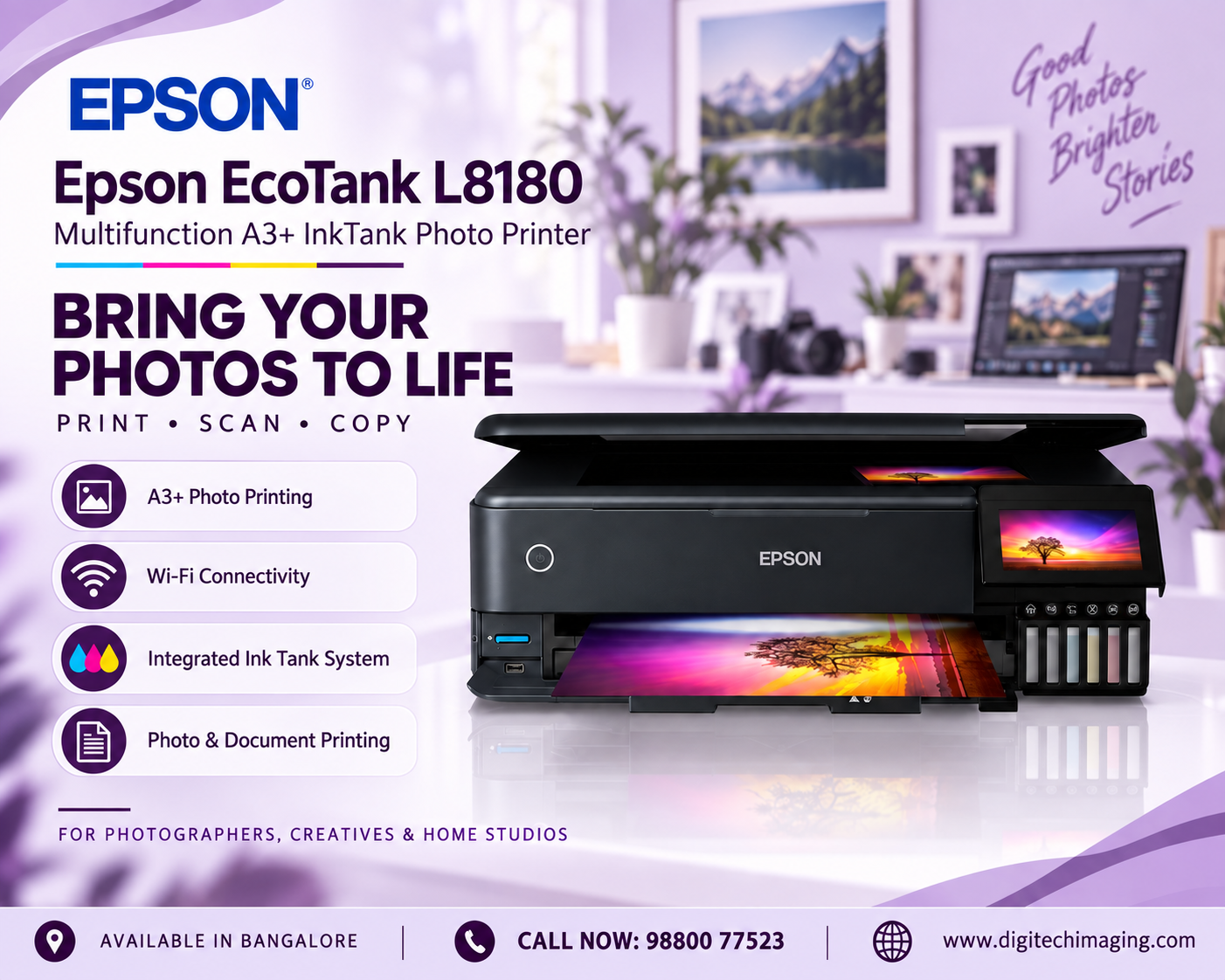
Are you searching for the EcoTank L8180 Multifunction A3+ InkTank Photo Printer in Bangalore for professional photography, a photo studio, graphic design, creative projects or premium home photo printing? The Epson EcoTank L8180 is a multifunction A3+ photo printer designed for users who need high-quality colour output, flexible media handling and convenient wireless connectivity.
The L8180 combines printing, scanning and copying with Epson’s six-colour Claria ET Premium ink system. It supports borderless photo printing up to A3+, Wi-Fi, Wi-Fi Direct and Ethernet connectivity, as well as direct printing through supported memory cards and USB devices.
Another important feature is its 10.9 cm colour touchscreen, which provides convenient access to printer functions. Epson also equips the L8180 with multiple paper paths for standard photo paper, A3+ media and selected speciality media.
For photographers and creative professionals in Bengaluru, the L8180 offers an interesting combination of photo-focused printing and multifunction convenience.
EcoTank L8180 Multifunction A3+ InkTank Photo Printer in Bangalore for Professional Photography
Professional photographers often need greater control over output size, colour, paper and presentation.
The L8180 supports photo printing up to A3+, allowing photographers to produce considerably larger prints than an A4-only model.
This can be useful for wedding photographs, portfolios, portraits, landscape photography, exhibition material and customer photo enlargements.
The six-colour ink configuration is particularly important here because photographic images contain gradients, skin tones, shadows and subtle colour transitions that can be more demanding than ordinary office documents.
For Bangalore photographers who want to produce selected prints in-house rather than outsourcing every job, the L8180 can provide greater control over the printing workflow.
A3+ Borderless Photo Printing
A major advantage of the L8180 is its support for borderless printing up to A3+.
A3+ provides photographers, designers and artists with additional creative space compared with A4.
Large borderless output can be useful for:
Wedding photographs, portrait enlargements, portfolios, posters, artwork reproductions, photography exhibitions, presentation material and decorative photo prints.
Borderless printing eliminates the ordinary white margin around supported photo prints, giving photographs a more finished appearance without requiring additional trimming in many situations.
For photo studios, the ability to move between smaller photo sizes and larger A3+ output increases the number of jobs that can potentially be completed using one printer.
High-Quality Black-and-White Photo Printing
Colour accuracy is important, but professional photography is not always about colour.
Black-and-white photography depends heavily on tonal transitions, shadow detail and neutral grey reproduction.
The L8180’s additional Grey ink is designed to support high-quality monochrome photographs.
This makes the printer particularly interesting for photographers working with portraits, fine-art photography, architectural photography and monochrome creative work.
A dedicated photo-oriented ink configuration therefore provides benefits beyond simply producing bright colour photographs.
Integrated EcoTank System for Photo Printing
The L8180 uses Epson’s refillable EcoTank architecture.
Instead of replacing small conventional ink cartridges, users refill the integrated tanks using compatible Epson ink bottles.
This approach can be particularly valuable for photographers and studios that produce prints regularly.
Epson states that replacement ink bottles can produce up to approximately 2,300 10 × 15 cm photos, based on its stated testing methodology. Actual yield will vary depending on the images, paper, settings, printing frequency and environmental conditions.
The initial ink set can also deliver a lower yield because some ink is required to charge the printer’s ink-delivery system during setup.
For a commercial studio, actual cost per photo should therefore be calculated using its own print sizes, paper choices and typical image coverage.
Flexible Paper Handling for Creative Professionals
Creative professionals often work with more than standard office paper.
The L8180 has been designed with multiple media-handling options to accommodate different printing requirements.
Epson provides photo-size and A4 front paper trays, an A3+ rear tray and an A3+ straight paper-feed path.
This arrangement gives photographers and designers greater flexibility when switching between everyday paper, photographic media and selected speciality material.
For businesses producing several types of creative output, flexible paper handling can be just as important as image quality.
Print on Media Up to 1.3 mm Thick
One particularly useful creative feature is support for selected media up to 1.3 mm thick through the appropriate straight paper path.
Epson also states that the straight paper feed can accommodate media up to approximately 2 metres long, subject to supported media specifications.
This expands the printer beyond ordinary photographs and documents.
Designers and artists can explore compatible craft papers, card and speciality media for selected projects.
Before using non-standard material, however, always confirm Epson’s current media requirements. Thickness alone does not mean every material is suitable for inkjet printing.
CD and DVD Printing
The L8180 also supports direct printing on suitable printable CDs and DVDs.
Although physical discs are less common for everyday file storage than they once were, disc printing can still be useful for photography studios, event businesses, wedding photographers, video production companies and organisations delivering branded media.
Instead of applying separate paper labels, compatible printable discs can receive artwork directly from the printer.
This is a niche feature, but for businesses that use it, it can add another service option to the same machine.

Wi-Fi Connectivity for Convenient Photo Printing
Modern photography workflows are increasingly wireless.
Images may be stored on computers, laptops, smartphones or other compatible devices. The L8180 includes Wi-Fi connectivity to provide flexibility within supported network environments.
For a home studio, this can make printer placement easier because the machine does not always need to remain physically connected to the primary computer through USB.
In a small creative business, network connectivity can also allow supported devices to access the printer according to the configured network setup.
Wi-Fi Direct for Flexible Device Connections
The L8180 also supports Wi-Fi Direct.
Wi-Fi Direct allows supported devices to communicate directly with the printer without requiring the conventional local wireless network for that particular connection.
This can be useful in studios where different devices are used during production or where temporary direct access to the printer is convenient.
The combination of Wi-Fi and Wi-Fi Direct makes the printer adaptable to different home and professional workflows.
Ethernet Connectivity for Studios and Offices
Wireless connectivity is convenient, but professional environments may prefer wired networking.
The L8180 includes Ethernet connectivity, allowing it to be integrated into a compatible wired network.
This can be useful in photo studios, design agencies and creative offices where multiple computers need predictable network access to the same printer.
Businesses can therefore choose between Wi-Fi, Wi-Fi Direct and Ethernet according to their infrastructure.
Direct Printing from SD Cards and USB Devices
The L8180 can also work independently of a computer for certain workflows.
Epson provides an SD card slot and USB direct-printing functionality.
This is particularly convenient for photographers who need to review or print images without always opening them on a separate computer first.
The printer’s 10.9 cm colour touchscreen supports navigation and interaction with these functions.
For photo studios, direct media access can provide another way to handle quick printing jobs.
10.9 cm Colour Touchscreen
A multifunction photo printer can include many settings, so the control interface matters.
The L8180 incorporates a 10.9 cm colour touchscreen.
This allows users to access printer functions through a visual interface and helps with tasks such as direct media printing and printer operation.
A larger colour interface can be particularly useful when a printer is frequently used without a computer.
Scanning with the Epson L8180
The L8180 is not only a printer.
It includes a flatbed colour image scanner using a CIS sensor. Epson specifies an optical resolution of 1,200 × 2,400 dpi and a maximum scanning area of approximately 216 × 355.6 mm.
This makes it useful for digitising photographs, artwork and everyday documents within the supported size.
Epson lists approximate scanning times at 200 dpi of around six seconds for black and eleven seconds for colour.
For photographers, the scanner adds flexibility when working with existing physical photographs or documents.
Copy Function for Everyday Requirements
Because the L8180 is multifunctional, users can also make copies without relying on a separate copier.
This can be useful for home studios and creative businesses that occasionally need to duplicate ordinary documents.
It is important, however, to understand the L8180’s positioning. Its major strength is photo and creative printing rather than being a high-volume departmental office copier.
Businesses whose primary requirement is hundreds of office copies each day should compare dedicated business multifunction models.
Heat-Free Printing Technology
Epson uses Micro Piezo Heat-Free Technology in the L8180.
Unlike printing systems that depend on heat during the ink-ejection process, Epson’s Micro Piezo technology operates without heat at that stage.
Epson highlights this approach in relation to consistent printing performance and reduced energy consumption.
For photographers, the more important practical consideration remains output quality and workflow, but energy efficiency can still be relevant for equipment used regularly.
EcoTank L8180 Multifunction A3+ InkTank Photo Printer in Bangalore for Photo Studios
Photo studios are among the clearest potential users of this printer.
A studio may need passport-size photos, standard photographs, portraits, wedding images, portfolios and larger customer prints.
Having an A3+ printer in-house can give the business more control over selected jobs.
The six-colour ink system, borderless A3+ capability, multiple media paths and direct printing options make the L8180 particularly oriented toward photographic work.
However, every studio should estimate its expected monthly volume, print sizes and paper costs before choosing equipment.
Epson L8180 for Photographers
Photographers often care about details that may be less important to an ordinary office-printer buyer.
Tonal transitions, skin tones, black-and-white output, media choice and large-format capability can all influence the purchasing decision.
The L8180 addresses these needs through its six-colour system, Grey ink, A3+ support and speciality-media handling.
It can therefore be considered by wedding photographers, portrait photographers, event photographers, landscape photographers and photography enthusiasts who want to produce high-quality prints themselves.

Epson L8180 for Graphic Designers and Artists
The printer can also be useful beyond photography.
Graphic designers, artists and other creative professionals often need physical proofs, artwork prints, presentation pieces and portfolio material.
Support for A3+ output gives designers more space than A4, while flexible media handling opens possibilities for selected creative projects.
For colour-critical professional work, users should still implement an appropriate colour-management workflow, including suitable media settings and profiles where applicable.
Epson L8180 for Home Photo Enthusiasts
Not every L8180 buyer needs to run a commercial photo studio.
Photography enthusiasts who want greater control over their prints may also benefit from the printer.
A home user can produce family photographs, travel photography, framed prints, portfolios and creative projects without depending entirely on external printing services.
Because the L8180 also scans and copies, it can serve additional household requirements when necessary
L8180 vs Standard Four-Colour Ink Tank Printers
A standard four-colour EcoTank printer can be a sensible choice for documents, school projects and general colour printing.
The L8180 serves a different purpose.
Its six-colour Claria ET Premium system, Grey ink, A3+ borderless output and expanded media handling are focused much more heavily on photographic and creative applications.
Therefore, choosing between them should not simply be based on which printer has more features.
For invoices and ordinary documents, a standard office EcoTank may be more economical and practical. For photography and creative output, the L8180’s specialised features become more valuable.
L8180 vs A4 Photo Printers
An A4 photo printer can be sufficient for users who mainly produce smaller photographs.
The L8180 becomes particularly useful when A3+ output is required.
For photographers selling enlargements, artists creating larger prints or designers preparing presentation work, the ability to move beyond A4 can significantly expand the range of possible output.
Before purchasing, determine the largest print size you realistically expect to produce.
Where to Buy EcoTank L8180 Multifunction A3+ InkTank Photo Printer in Bangalore
When buying a professional photo printer, consider more than the initial selling price.
Check the printer configuration, genuine ink availability, warranty, delivery, installation requirements and after-sales support.
For your Digitech website, create a strong internal conversion path:
EcoTank L8180 Multifunction A3+ InkTank Photo Printer in Bangalore – FAQs
Is Epson EcoTank L8180 an A3+ printer?
Yes. The L8180 supports borderless photo printing up to A3+, making it suitable for larger photographic and creative output.
Is Epson L8180 a multifunction printer?
Yes. It combines printing, scanning and copying in one machine.
How many ink colours does the L8180 use?
The printer uses a six-colour Claria ET Premium ink system, including Grey ink and separate black inks designed for its photo and document-printing requirements.
Can the Epson L8180 print black-and-white photos?
Yes. Epson specifically highlights the Grey ink in the six-colour system for enhanced black-and-white photographic output.
Does Epson L8180 have Wi-Fi?
Yes. The printer supports Wi-Fi and Wi-Fi Direct. It also includes Ethernet connectivity.
Can I print directly from an SD card?
Yes. Epson provides an SD card slot as well as USB direct-printing capability.
Can Epson L8180 print CDs and DVDs?
Yes. It supports printing directly onto suitable printable CDs and DVDs.
Does the Epson L8180 have a touchscreen?
Yes. The printer features a 10.9 cm colour touchscreen.
Is Epson L8180 suitable for a photo studio?
Its six-colour ink system, A3+ borderless printing, flexible media handling and photographic focus make it particularly relevant to photographers and photo studios. Suitability still depends on the studio’s expected print volume, media and workflow.
Can the Epson L8180 scan photos?
Yes. It has a flatbed CIS colour scanner with an optical resolution of 1,200 × 2,400 dpi.
What is the maximum supported media thickness?
Epson states that the appropriate straight paper-feed path can support selected media up to 1.3 mm thick.
Is Epson L8180 good for graphic designers?
Its A3+ output, six-colour photo system and speciality-media capabilities can make it useful for designers who need photographic, artwork, portfolio or proof printing.
EcoTank L8180 Multifunction A3+ InkTank Photo Printer in Bangalore – Final Verdict
The EcoTank L8180 Multifunction A3+ InkTank Photo Printer in Bangalore is designed for users whose printing requirements go beyond everyday documents.
Its biggest strengths are its six-colour Claria ET Premium ink system, A3+ borderless photo printing, Grey ink for monochrome photography, flexible media handling, Wi-Fi, Wi-Fi Direct, Ethernet, direct SD/USB printing and 10.9 cm colour touchscreen.
For photographers, photo studios, designers, artists and serious photography enthusiasts, these features provide significantly more creative flexibility than a conventional four-colour A4 ink tank printer.
The multifunction capability adds scanning and copying, while Epson’s EcoTank architecture provides refillable high-capacity ink tanks for ongoing printing.
However, selecting the right printer should always depend on your workflow. If your requirement is primarily standard A4 business documentation, a business-oriented EcoTank model may be more appropriate. If high-quality photography, A3+ borderless printing and flexible creative media are priorities, the L8180 is designed specifically around those requirements.
For customers searching for the EcoTank L8180 Multifunction A3+ InkTank Photo Printer in Bangalore, compare the current price, genuine ink availability, warranty, photo-paper requirements and after-sales support before making your purchase.