
Blog, Kyocera 3200i Price in India

Kyocera 3200i Price in India – TASKalfa MZ3200i Photocopier Features, Specifications & Buying Guide

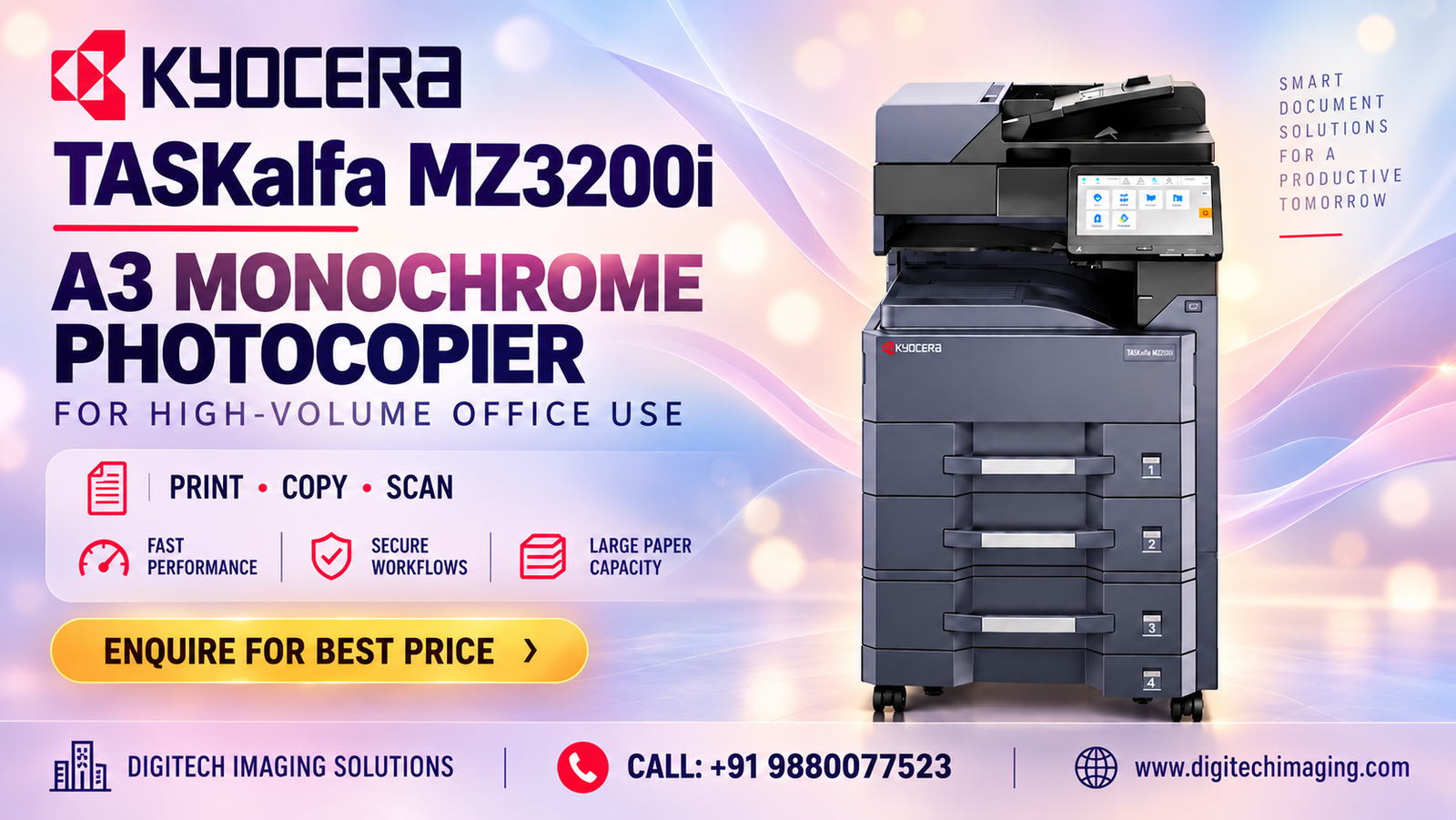
Kyocera 3200i price in India – TASKalfa MZ3200i photocopier

Are you Lookingfor the Kyocera 3200i price in India? The Kyocera TASKalfa MZ3200i is an A3 monochrome multifunction photocopier designed for businesses, corporate offices, schools, colleges, institutions, and shared workgroups.

This machine combines printing, copying, and colour scanning in one system. With speeds of up to 32 pages per minute on A4, automatic duplex printing, a 10.1-inch colour touchscreen, and expandable paper capacity, it supports a range of everyday office document requirements.

For buyers comparing photocopier prices in India, the initial cost is only one part of the decision. Toner consumption, document-feeder options, paper capacity, installation, warranty, and maintenance arrangements can affect the overall investment.

In this guide, we explain the Kyocera TASKalfa MZ3200i’s latest advertised price, features, specifications, benefits, toner, and purchasing considerations.

What Affects the Kyocera 3200i Price in India?

The final price depends on the equipment included in the package.

A quotation for the base machine may differ from one that includes a document processor, additional paper trays, a finisher, or optional fax.

Delivery, installation, warranty, and maintenance arrangements can also affect the total cost.

Before comparing offers, request an itemised quotation so you know exactly what each supplier is providing.

What Is the Kyocera TASKalfa MZ3200i?

The Kyocera TASKalfa MZ3200i is an A3 black-and-white multifunction photocopier.

It provides printing, copying, and scanning as standard functions, with fax available as an option. Although its printed output is monochrome, it can scan documents in colour.

This combination is useful for workplaces that mainly produce black-and-white reports, invoices, forms, and correspondence but also need to digitise documents containing coloured information.

The MZ3200i is designed for shared office use, with network connectivity and optional accessories to support different document workflows.

Kyocera 3200i Specifications in India

The following table summarises the main TASKalfa MZ3200i specifications. Confirm the supplied configuration before purchasing.

Specification

Kyocera TASKalfa MZ3200i

Machine type

A3 monochrome multifunction photocopier

Standard functions

Print, copy, scan

Fax

Optional

A4 print speed

Up to 32 ppm

Print resolution

Up to 1,200 × 1,200 dpi

Automatic duplex

Standard

Control panel

10.1-inch colour touchscreen

Standard memory

4 GB

Standard storage

32 GB SSD

Warm-up time

Approximately 18 seconds

Standard paper input

1,100 sheets

Maximum paper input

Up to 4,100 sheets with options

Toner

Kyocera TK-7130

Rated toner yield

Approximately 20,000 pages

Why Choose the Kyocera 3200i for Office Use?

An office photocopier should match the organisation’s document requirements.

The MZ3200i can handle routine printing, copying, and scanning through one shared machine.

Its A3 paper support is useful for larger documents, while automatic duplex printing allows users to produce two-sided reports and manuals.

Optional paper feeders and document processors provide additional configuration choices for workplaces with more demanding requirements.

Before selecting the machine, consider your monthly print volume, number of users, paper sizes, and scanning needs.

A3 Printing and Copying

One of the main advantages of the TASKalfa MZ3200i is its support for A3 paper.

Businesses can use the machine for everyday A4 paperwork as well as larger spreadsheets, reference drawings, training materials, and administrative documents.

This flexibility can reduce the need for a separate A3 printer when larger-format jobs are required occasionally.

For organisations comparing A3 and A4-only machines, paper-size requirements should be considered before the purchase price.

32 PPM Printing Speed

The MZ3200i prints at up to 32 pages per minute on A4 under the manufacturer’s specified conditions.

This supports everyday production of reports, invoices, correspondence, and other office documents.

Actual speed depends on document complexity, paper size, settings, and selected finishing functions.

For a shared workplace, consider the number of employees sending jobs to the device and the expected workload during busy periods.

Automatic Duplex Printing

Automatic duplex printing allows the machine to print on both sides of a sheet without requiring users to turn the paper manually.

This is useful for reports, manuals, internal circulars, and multi-page documents.

Two-sided printing can also reduce paper consumption when single-sided output is unnecessary.

For organisations producing regular document batches, duplex printing is a practical feature to include in the overall cost comparison.

Colour Scanning and Digital Document Management

The TASKalfa MZ3200i supports colour scanning even though it prints in monochrome.

This allows offices to digitise documents containing coloured charts, stamps, photographs, and annotations.

Scanning can support electronic filing, internal document sharing, and administrative workflows.

Kyocera lists several scan destinations, including network folders, email, FTP, and USB, depending on the configured environment.

Optional Document Processors

For offices that regularly scan or copy multi-page files, a document processor can reduce manual handling.

Kyocera lists optional processors including the DP-7140, DP-7150, DP-7160, and DP-7170. These provide different feeder capacities and scanning capabilities.

When comparing the Kyocera 3200i price in India, confirm which document processor is included in the quotation.

Do not assume every advertised package contains the same feeder.

10.1-Inch Colour Touchscreen

The MZ3200i includes a 10.1-inch colour touchscreen.

The control panel provides access to the machine’s printing, copying, scanning, and configuration functions.

A large interface can make common tasks easier to navigate in shared workplaces.

During installation, organisations should review the available user-management settings and configure the device for their requirements.

Paper Capacity for Business Productivity

Paper capacity affects how often employees need to refill the machine.

The MZ3200i provides 1,100 sheets of standard input capacity, consisting of two 500-sheet cassettes and a 100-sheet multipurpose tray. Compatible optional equipment can expand the total capacity to 4,100 sheets.

Additional paper sources may be useful for offices producing large document batches or working with different supported paper sizes.

Before ordering optional trays, confirm their compatibility and the available installation space.

Kyocera TK-7130 Toner Cartridge

The TASKalfa MZ3200i uses the Kyocera TK-7130 black toner cartridge.

Kyocera rates the cartridge for approximately 20,000 pages under specified test conditions. Actual yield depends on page coverage, print settings, and usage.

For businesses producing large quantities of black-and-white documents, toner yield is an important factor in estimating ongoing costs.

Confirm the availability and current price of compatible genuine toner before purchasing the machine.

Kyocera 3200i Running Cost in India

The purchase price is only one part of the total cost of ownership.

Businesses should also consider toner, paper, maintenance, replacement parts, electricity, and potential downtime.

A practical cost estimate begins with the expected monthly page volume.

For example, an office printing several thousand pages per month may place greater importance on toner costs and service arrangements than a workplace with occasional printing requirements.

Ask your supplier for details about available maintenance plans and what each plan includes.

Network Printing for Shared Offices

A central photocopier should work with the organisation’s existing computers and network.

The MZ3200i includes wired network connectivity, allowing supported workstations to send jobs to a shared machine.

Before installation, confirm driver compatibility, network requirements, and any necessary access permissions.

If wireless networking is essential, check the supplied configuration. Kyocera lists the IB-37 wireless LAN interface as an optional accessory for this series.

Document Security and Office Workflows

Photocopiers can handle confidential information such as invoices, contracts, employee records, and customer documents.

Organisations should review supported security and user-management features before installation.

The available capabilities may depend on the device configuration, firmware, and optional accessories.

For workplaces with specific security requirements, discuss the configuration with the supplier and IT administrator.

Kyocera MZ3200i for Corporate Offices

Corporate offices often need a shared machine for finance, administration, HR, and operations teams.

The MZ3200i can support routine monochrome document production while providing A3 capability for larger material.

Automatic duplex printing is useful for multi-page reports, and scanning can support digital record management.

The appropriate configuration depends on the number of users, monthly workload, and required accessories.

Kyocera MZ3200i for Schools and Colleges

Educational institutions regularly produce worksheets, notices, examination-related documents, and administrative records.

An A3 monochrome photocopier can handle standard A4 handouts and selected larger educational material.

Schools and colleges should estimate their normal and peak workloads, particularly during examination periods, before selecting the final configuration.

Kyocera MZ3200i for Hospitals and Institutions

Hospitals, clinics, and other institutions may use a multifunction photocopier for administrative forms, reports, and internal records.

A shared machine can support printing, copying, and scanning through one device.

Organisations handling confidential information should also review their security and document-retention requirements.

Kyocera MZ3200i for Small and Medium Businesses

Small and medium businesses may need a central machine for everyday document production.

The MZ3200i combines A3 monochrome printing, copying, and scanning with automatic duplex printing.

Before purchasing, estimate the number of users, monthly page volume, required paper sizes, and scanning requirements.

A suitable configuration should match the business’s actual workflow.

Where to Buy the Kyocera 3200i in India

When choosing a supplier, confirm the exact TASKalfa MZ3200i model and the contents of the offered package.

Check warranty terms, consumable availability, delivery arrangements, and service support.

If your organisation has specific printing requirements, share your expected monthly volume and required accessories when requesting a quotation.

For customers in Bangalore, Digitech Imaging Solutions can be contacted for current product information and availability.

Kyocera 3200i Price in India – Frequently Asked Questions

Is the Kyocera MZ3200i a colour photocopier?

No. It prints and copies in monochrome but supports colour scanning.

What is the printing speed of the MZ3200i?

It offers up to 32 pages per minute on A4.

Does the Kyocera MZ3200i support A3 paper?

Yes. It supports A3 printing and copying.

Does the MZ3200i support automatic duplex printing?

Yes. Automatic two-sided printing is standard.

Which toner does the Kyocera MZ3200i use?

It uses the Kyocera TK-7130 black toner cartridge.

What is the TK-7130 toner yield?

Kyocera rates the cartridge for approximately 20,000 pages under specified test conditions. Actual yield varies with usage.

Is a document feeder included with the MZ3200i?

Different optional document processors are available. Confirm which, if any, is included in your supplier’s package.

Can the paper capacity be expanded?

Yes. Standard input capacity is 1,100 sheets, with compatible options allowing expansion to 4,100 sheets.

Where can I enquire about the Kyocera MZ3200i in Bangalore?

Contact Digitech Imaging Solutions for current product information, pricing, and availability.

Conclusion: Kyocera 3200i Price in India

The Kyocera TASKalfa MZ3200i is an A3 monochrome multifunction photocopier designed for shared office document workflows.

Its principal features include up to 32 ppm A4 printing, automatic duplex, colour scanning, a 10.1-inch touchscreen, and expandable paper capacity.

When comparing the Kyocera 3200i price in India, review the complete machine configuration, consumable costs, warranty, and service arrangements rather than focusing only on the advertised base price.

Contact Digitech Imaging Solutions to enquire about the latest Kyocera TASKalfa MZ3200i price and availability.

CALL NOW: 98800 07525

Are You Looking for the Kyocera TASKalfa MZ3200i A3 Monochrome Photocopier?

Upgrade your office printing with the Kyocera TASKalfa MZ3200i, a multifunction photocopier designed for busy offices, schools, colleges, and businesses. Enjoy up to 32 ppm A4 printing, A3 paper support, automatic duplex printing, copying, and colour scanning.

Leave a Reply

Your email address will not be published. Required fields are marked *